NEWOneKey · now on Mac, iPhone & Android

One voice.
Every device you own.

On your Mac, press a hotkey and dictate clean text into any app. On your phone, speak a thought and get a structured note with tasks. One app, every device.

Free for 7 daysNo credit cardmacOS 14+ · iOS · Android
MailFileEditViewWindow
9:41
New Message
Hold Fn to dictate
ToSarah Chen
SubjectQ3 review — follow-up
Send
Hold Fn and start talking…
Listening On-device
Works in every app you already use
MailSlackVS CodeNotionChromeMessages
How it works

One hotkey. From thought to text.

You speak 3–4× faster than you type. OneKey closes the gap — no copy-paste, no switching to a notes app, no cleanup afterward.

01/03
Hold the Fn key
Anywhere on your Mac — in your editor, your inbox, a browser form — hold Fn and start talking. No app to open, no window to find.
02/03
It transcribes on-device
Local Whisper turns speech into text in real time. An optional AI pass cleans up the rambles so what lands is tidy, not a raw transcript.
03/03
Text lands in place
The finished text is inserted right where your cursor is — then logged to your history and time-saved dashboard.
OneKey for Mac · Desktop

Dictation that respects your Mac.

Not a notes window with a microphone. OneKey lives in the menu bar and works system-wide — fast, local, and tuned to wherever you're typing.

Talk into anything. It just types.

One global hotkey works in every app — your editor, your inbox, a Slack thread, a browser form. OneKey inserts the text right where your cursor is. No window to open, nothing to copy across.

  • Hold Fn to talk, release to insert
  • Inserts into any text field, system-wide
  • Personal Dictionary keeps brand names & jargon right
Mail
Slack
Code
Browser
Notion
Mail
Hold Fn → text inserted

Private by default. Runs on your device.

Transcription happens locally with Whisper, Parakeet, or Apple Speech — your voice never leaves the Mac. Works on a plane, in a SCIF, anywhere. Want a cloud model? That's a choice you opt into, not a default.

  • 100% offline by default — no account required to dictate
  • Open-source core you can actually audit
  • Optional cloud providers when you want the extra accuracy
On-device
0 bytes leave your Mac
Whisper (local) Active
Parakeet Active
Apple Speech Active
Works fully offline

Watch the hours add up.

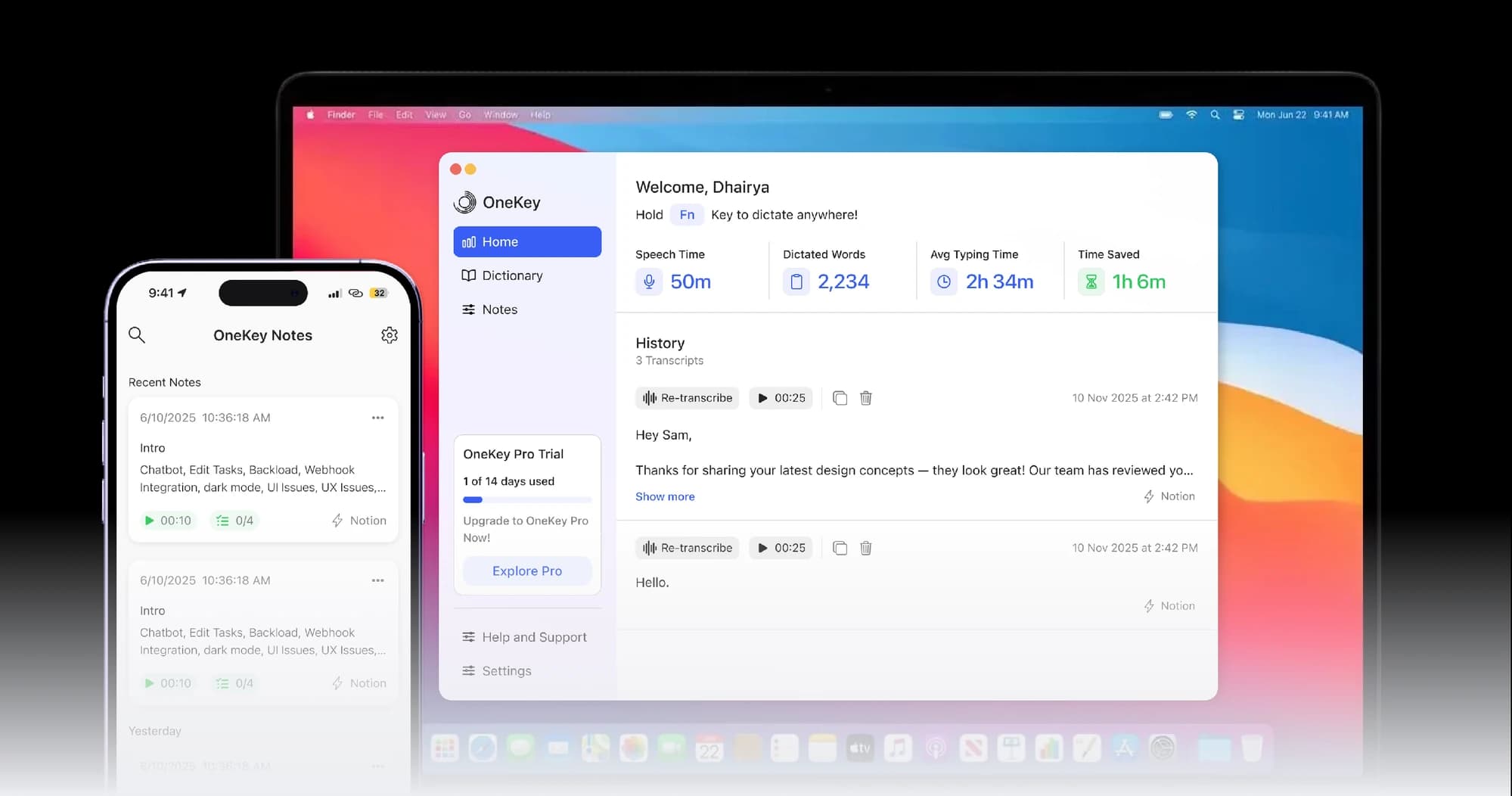
Every dictation is tracked on your dashboard — words captured, speaking time, and the hours you've saved versus typing. Your full history stays searchable, so you can replay, copy, or re-transcribe any note in a tap.

  • Dashboard: words dictated, speech time & time saved
  • Searchable history of every transcript
  • Re-transcribe, copy, or export any note instantly
This week
↑ 23%
50m
Speech Time
2,234
Dictated Words
2h 34m
Avg Typing Time
1h 6m
Time Saved
OneKey Notes · iPhone & Android

Your second brain, in your pocket.

Ideas arrive while walking, between meetings, mid-conversation. Tap the mic, say what's on your mind, and OneKey turns scattered thoughts into clear, structured notes — with the tasks already pulled out. App is live now.

500+
founders & executives
10+hours saved weekly
Free up to 2,000 words / mo
Listening
AI cleaned · 24s
3 tasks → Notion
9:41
Recording…
00:34
Listening
PauseDone →
9:41
Good morning,
Hi Dhairya! 👋
21
Notes
120
Saved Min
5
Day Streak
30 MAY 2026
Tasks Today
3 left
Email Sarah about Q3
10:00
Walk Jasper around the park
12:30
Pick up dry cleaning
5:00 PM
9:41
Note
30 MAY · 24 SEC
Quarterly product review
✨ AI cleanedWorkQ3
10:36 AM
Things to bring up tomorrow: new pricing tier — final call on annual. Pull onboarding metrics week over week. Ask Mike about the Polar webhook bug.
3 TASKS EXTRACTED
Pull onboarding metrics WoW
Email Sarah for Q3 numbers
Ask Mike re: Polar webhook
Smart Summarisation
Speak freely — ramble, think out loud, change your mind. OneKey returns a precise, contextual summary every time.
AI cleanup
Action Plan
It pulls a prioritized action list straight out of your words, so you act on what matters and stay ahead.
Tasks extracted
Seamless Automation
Trigger webhooks with one spoken word and let the work happen for you — Notion, Slack, your CRM, anywhere.
Webhook export
Get it on iPhone Get it on AndroidFree to install · your second brain in your pocket.
One brand, every device

Your voice, on every device you own.

OneKey is one brand, sold as a suite. Dictation on the desktop, voice notes in your pocket — your second brain, wherever you are.

Desktop
OneKey for Mac
System-wide dictation into any app, on-device. Press a hotkey and keep working.
iPhone
OneKey Notes
Tap the mic, speak a thought, and get a clean, structured note with tasks pulled out.
Android
OneKey Notes
The same voice notes, your whole second brain, synced and ready on Android too.
Own OneKey Pro on Mac with a one-time purchase — and get OneKey Notes free on iPhone & Android.
Pricing

One license. Yours forever.

Try every feature free for 7 days, no card. Then own OneKey for Mac with a single one-time purchase — and OneKey Notes for your phone is a free download.

Free trial
For trying it out.
$0 /7 days
No credit card required
Mac & mobile
  • Local on-device dictation on Mac
  • Full AI cleanup during the trial
  • Voice notes on iPhone & Android
  • Personal Dictionary
Start free trial
Team
For small teams.
Custom
Volume licensing
All devices
  • Everything in Pro
  • Volume licenses for your team
  • Centralized billing
  • Priority support
Contact sales
7-day free trial, no cardOne-time purchase — yours to keep, with free updates.
Loved by makers

The keyboard, only when you want it.

★★★★★Developers, writers & founders who switched off the keyboard.
★★★★★
"It nails the technical terms my old dictation always mangled, and the time-saved dashboard is weirdly motivating. I stopped thinking about typing."
L
Lena Cheng
Technical writer
★★★★★
"On the Mac all day, then I dictate notes on the train home and they're synced. One purchase for both was the easiest yes."
J
Jonas Weber
Founder
★★★★★
"I have RSI, so typing all day isn't an option. OneKey lets me work in any app hands-free, offline, with accuracy I trust. It quietly gave me my workflow back."
P
Priya Anand
Product designer
"3× more output" — Sam, dev
"Replaced Apple Dictation" — Mia, PM
"Offline is everything" — Tom, lawyer
"My wrists thank me" — Ravi, writer
"Same app on my phone" — Hana, founder
"The hotkey is muscle memory now" — Ben, eng
"3× more output" — Sam, dev
"Replaced Apple Dictation" — Mia, PM
"Offline is everything" — Tom, lawyer
"My wrists thank me" — Ravi, writer
"Same app on my phone" — Hana, founder
"The hotkey is muscle memory now" — Ben, eng
FAQ

The before-you-download questions.

Does my voice get sent to a server?+
No — by default OneKey for Mac transcribes entirely on-device using local models (Whisper, Parakeet, or Apple Speech). It works with no internet at all. Cloud providers are available, but only if you explicitly turn one on.
Is OneKey for Mac a subscription?+
No — the Mac app is a one-time purchase. Pay once for a lifetime license with all features and free updates. OneKey Notes for iPhone and Android is a separate free download you can pair with the same account.
Which apps does dictation work in?+
All of them. OneKey inserts text system-wide via a global hotkey, so it works in your editor, email, Slack, browser forms, design tools — anywhere you can type.
What are the Mac requirements?+
OneKey for Mac runs on Apple Silicon (M-series) Macs with macOS 14 or later. It installs as a notarized DMG or via Homebrew, and needs Accessibility permission to insert text.
Can I get a refund?+
Yes. Start with the free 7-day trial to make sure it's for you, and there's a 7-day money-back guarantee on your purchase if it isn't a fit.

Stop typing what you could just say. On every device.

Download OneKey for Mac and try every feature free for 7 days. No credit card. Apple Silicon, macOS 14+. Your mobile app is included.

Download for Mac Get it on mobile